Bid Data Duplication: How to Find and Fix It Before You Submit
Bid Data Duplication: How to Find and Fix It Before You Submit ! Sketch-framed title card for bid duplication article Bid data duplication is the same fact living in more than one place: a quantity in the takeoff and again in the estimate, a scope item in the spec and again in a drawing note, a vendor price in an email and again in a spreadsheet.
Bid data duplication is the same fact living in more than one place: a quantity in the takeoff and again in the estimate, a scope item in the spec and again in a drawing note, a vendor price in an email and again in a spreadsheet. Once those copies drift apart, your bid is priced on whichever one someone happened to read. The fix is not more checking at the end. It is one logged source of truth per item, a register that shows which document is current, and a review that compares the copies before the bid goes out. ArosBid is built around that idea: it reads the entire bid document set, including front-end clauses, and tracks approvals, vendor quotes and document compliance in one command center, while people keep authority over what gets submitted.
TL;DR
- Duplication rarely means identical files. It means the same requirement or number stated in several places, then changed in only some of them.
- Addenda are the biggest source of drift. One state audit found that most addenda adjusting quantities made several changes at once.
- Keep a bid register: one current revision per item, older ones marked superseded, never deleted.
- Before submitting, compare the proposal total to the estimate total and log every difference until it is explained.
- Software helps most when it reads the full document set and works inside Excel and Outlook, so your team does not re-key anything.
Table of Contents
- What bid data duplication looks like in construction
- Why it costs you bids
- Where duplication starts in your own process
- A five-step method to control it
- The pre-submission check that catches what remains
- Tools and processes that prevent duplicates
- Our view: fewer copies, not more checkers
- See it on your own bid
- FAQ
- Sources
What bid data duplication looks like in construction
In a software database, a duplicate is a repeated record. In a bid, it is subtler. The same information exists in several documents or tools, and each copy can be edited separately. Five places show up again and again:
- Drawings and specifications. A component described on a sheet and again in a spec section, sometimes with different wording.
- Addenda. A change issued once but absorbed by only some of the documents it affects.
- Takeoff and estimate. Quantities typed into the estimate by hand after being measured elsewhere.
- Vendor quotes. The same supplier quote arriving in several revisions, by email, portal and phone, with scope assumptions that differ.
- Proposal and estimate. A total on the cover letter that no longer matches the estimate behind it.
None of these looks like an error until someone prices from the wrong copy. That is why duplication is a compliance problem as much as a data problem: the bid you submit has to respond to the documents as they stand on bid day.
Why it costs you bids
Addenda multiply the copies
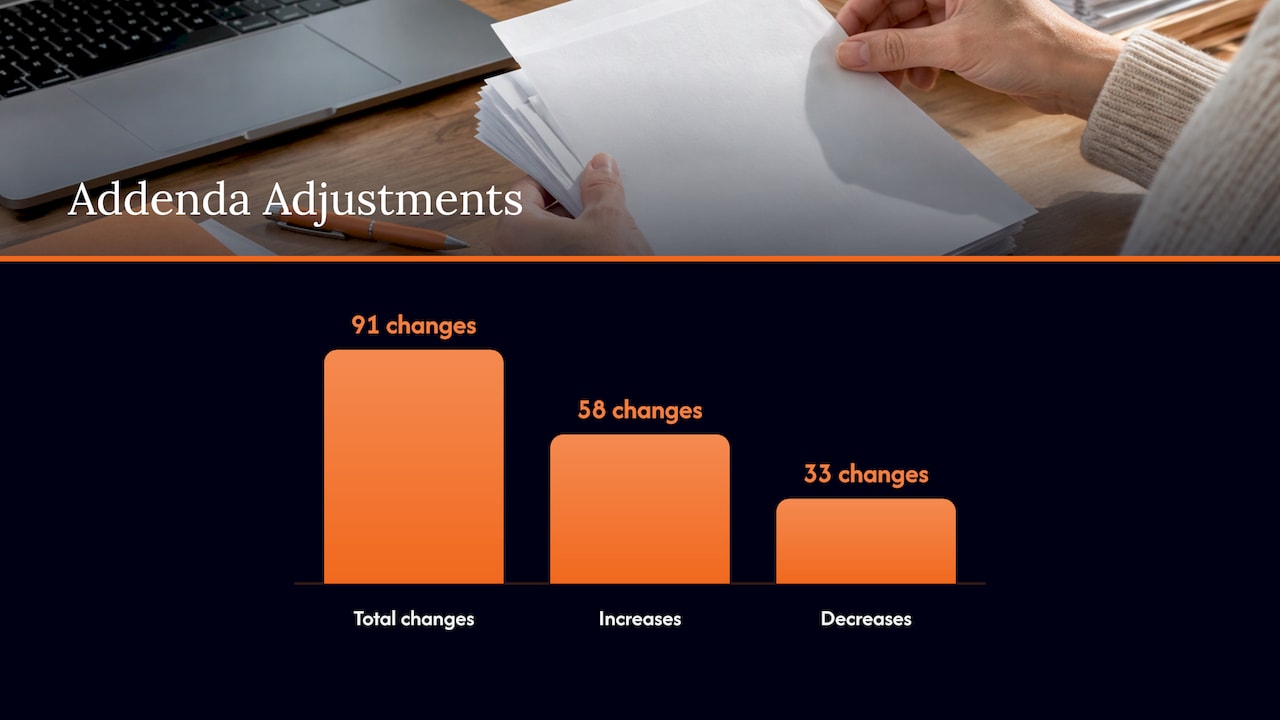
When the owner changes the documents mid-bid, every duplicate has to change together. The Oregon Department of Transportation’s internal audit of its addenda process found that 96% of 33 addenda letters adjusting bid-schedule quantities made multiple adjustments, with 91 changes across 27 projects (58 increases and 33 decreases). The audit also notes that specifications, bid schedules and plans are commonly altered together in a single addendum. That is a public agency’s highway work, not your project, but the pattern is familiar: one addendum touches several documents, and your estimate has to follow every one.
Timing makes it worse. A University of Reading case study of UK tenders found that 90% of addenda were issued in the final two weeks of a six-week tender period, the last arriving about two days before submission. One contractor in the study ended up submitting a qualified bid even though the client required a bid free from qualifications. The lesson holds anywhere: late changes leave little time to find every copy that needs updating.
Redundant documents breed conflicts
A peer-reviewed study of tender drawings for a port expansion counted 426 errors and omissions across 77 drawings. One component appeared on nine drawings, and 56 drawings (72.73%) contained errors or omissions. The authors point to information redundancy as the reason every change became a catalyst for manual updates across sheets. The contractor in the study declined to submit a lump-sum bid because the financial risk was too high.
That is the extreme case, but you do not need 426 errors to lose a job. One missed clause or one stale quantity can be enough to make a bid non-responsive or underpriced.
Where duplication starts in your own process
Outside documents are only half the story. Most teams also create duplicates internally:
- Re-keying between tools. Quantities move from takeoff to a spreadsheet to a proposal. Each hand-off is a chance for a typo or a skipped update.
- Parallel quote trackers. The estimator keeps one list of vendor quotes, the project manager another, and the inbox holds a third.
- Copied estimates. Starting from an old project is efficient, but leftover rows, formulas and notes from the previous job carry hidden duplicates into the new one.
- Unlogged questions. An RFI answered by email never makes it into the estimate notes.
A useful test: pick any number in your proposal and ask where it was typed first. If the answer is “in three places,” you have duplication.
A five-step method to control it
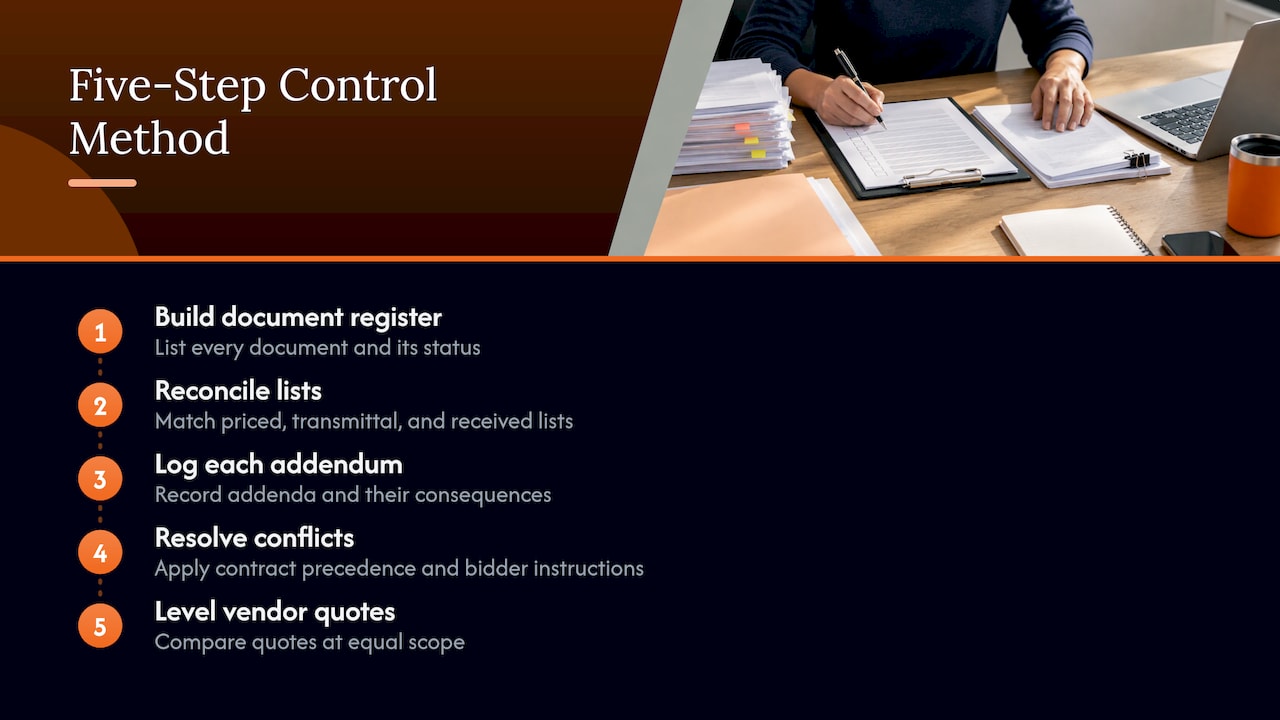
Step 1: Build one register for every document
Start with a register that lists each document by number and title, revision, date received, source, and status (current or superseded). Our guide to the bid register for construction covers what to log. The “date received” and “source” columns matter most: if an owner later disputes what you had, the register is your evidence.
Keep superseded documents. Mark them, archive them, and never delete them, so the decision trail survives to bid day.
Where this goes wrong: registers built by hand fall behind exactly when addenda arrive in bunches. In ArosBid, the document set is read as a whole, front-end clauses included, so the register starts from what the documents actually say rather than from what someone remembered to log.
Step 2: Reconcile three lists before comparing revisions
When a new issue arrives, line up what you priced, what the transmittal says was reissued, and what you actually received. Anything that appears on one list and not another is a gap: a sheet added, dropped, superseded, or never delivered. Pair sheets by sheet number in the title block, not by page order.
Then read every numbered addendum item, even when no sheet is reissued. An addendum can change scope with no drawing change at all. Our addendum management guide and the bid-day addenda log walk through this in detail.
Step 3: Log each addendum against its consequences
For every addendum item, record four things: the reference, the affected item, the action required, and whether it is done. This turns an addendum from a document into a task list, and it is the step that stops one-document absorption, where the spec is updated but the estimate and proposal are not.
Assign one owner per area. Estimators own pricing and quantities, project managers own scope and exclusions, and whoever handles compliance owns forms and certifications. When everyone owns a duplicate, no one updates it.
Step 4: Resolve conflicts with the contract, not with a guess
Two documents that disagree are not always in real conflict. Often one is simply more detailed, and the more specific instruction governs its scope. When two statements truly cannot both be satisfied, check the contract’s order of precedence clause and the instructions to bidders. Where those do not settle it, ask a question before the deadline if the rules allow, and write down how you priced the item either way.
Our piece on spec conflicts lists five fields worth logging for every conflict: the location of each statement, the wording, the governing rule, the pricing decision and the question status.
Step 5: Level vendor quotes into one record
Vendor quotes are duplicated by nature: several suppliers, several revisions each, often scope-adjusted by email. Track each quote by vendor, revision, date and inclusions or exclusions, and compare them on equal scope. Vendor quote leveling in ArosBid keeps quote tracking beside the estimate so a revised number replaces the old one instead of sitting next to it.
The pre-submission check that catches what remains
Even good process leaves a few duplicates. A final review, done by someone who did not build the estimate, is where they surface. A bid-day checklist from a construction contractor recommends comparing the owner’s or architect’s addenda log with what your team actually received, reading scope and spec sections side by side with the estimate, and checking formulas, hidden rows, broken links and cells copied from older projects.
A practical version for your team:
| Check | What you compare | Pass condition |
|---|---|---|
| Addenda | Owner’s addenda log vs. your register | Every addendum received and acknowledged |
| Total | Proposal total vs. estimate total | Every difference explained (tax, contingency, freight) or fixed |
| Quotes | Vendor quote revision vs. number in estimate | Latest revision used, scope matches |
| Documents | Revision priced vs. current revision | One current revision per item |
| Submission copy | Final package | No drafts, internal notes or duplicate revisions |
Treat any “unresolved” line as a stop. If the proposal and the estimate disagree and no one can say why, the bid is not ready. Save the submitted package with its revision and timestamp so you can show later exactly what went out.
For a fuller pre-bid routine, see our estimate QA/QC process.
Tools and processes that prevent duplicates
Process comes first, then tooling. Public owners already apply the principle. The University of Alabama’s construction standards require that addenda be uploaded as revisions to the bid-set specifications, not as separate documents, and that the design team confirm the full specification set is uploaded, with no partial or draft sets, before release. The same idea applies on your side: one document, many revisions, one current.
When you evaluate tools, look for these traits:
- Reads the whole document set. Clauses buried in front-end documents are where conflicts hide, so a tool that only reads drawings or only reads specs leaves gaps.
- Works where your team already works. If estimators live in Excel and project managers in Outlook, a tool that forces a move creates a new silo.
- Keeps humans in charge. Automated comparison can find differences, but people must decide what a difference means for cost and compliance.
- Covers the whole cycle. Intake, takeoff, estimate, vendor quotes, proposal, buyout and debrief should share one record, so the same number is never typed twice.
See how AI tender review and construction estimating and bidding software apply these ideas.
Perspective
Our view: fewer copies, not more checkers
Most teams respond to duplication by adding a reviewer. That helps, but it treats the symptom. The cause is that a bid is assembled from many documents and many tools, and nothing ties them together.
We built ArosBid around one record per bid. The platform reads the entire set of bid documents, including the front-end clauses that estimators rarely have time to read twice, and automates error-checking so conflicting specifications and missed clauses surface early. People keep authority over what is submitted: the software flags, your team decides.
The same command center tracks bid approvals, vendor quotes and document compliance, and it integrates with Excel and Outlook, so your estimators do not have to abandon the tools they already use. A vendor quote revision lands in the same place as the estimate that depends on it. A debrief after the bid feeds the historical cost library for the next one.
That is what we mean by running the complete bid cycle in one place: intake through buyout and debrief, with each fact entered once.
arosbid team
See it on your own bid
If your team is re-keying quantities, chasing quote revisions through inboxes or reconciling addenda by hand, a short walkthrough shows how ArosBid handles the bid cycle from document intake through buyout and debrief. Plans are One Desk, The Department and The Whole Year, listed on the pricing page.
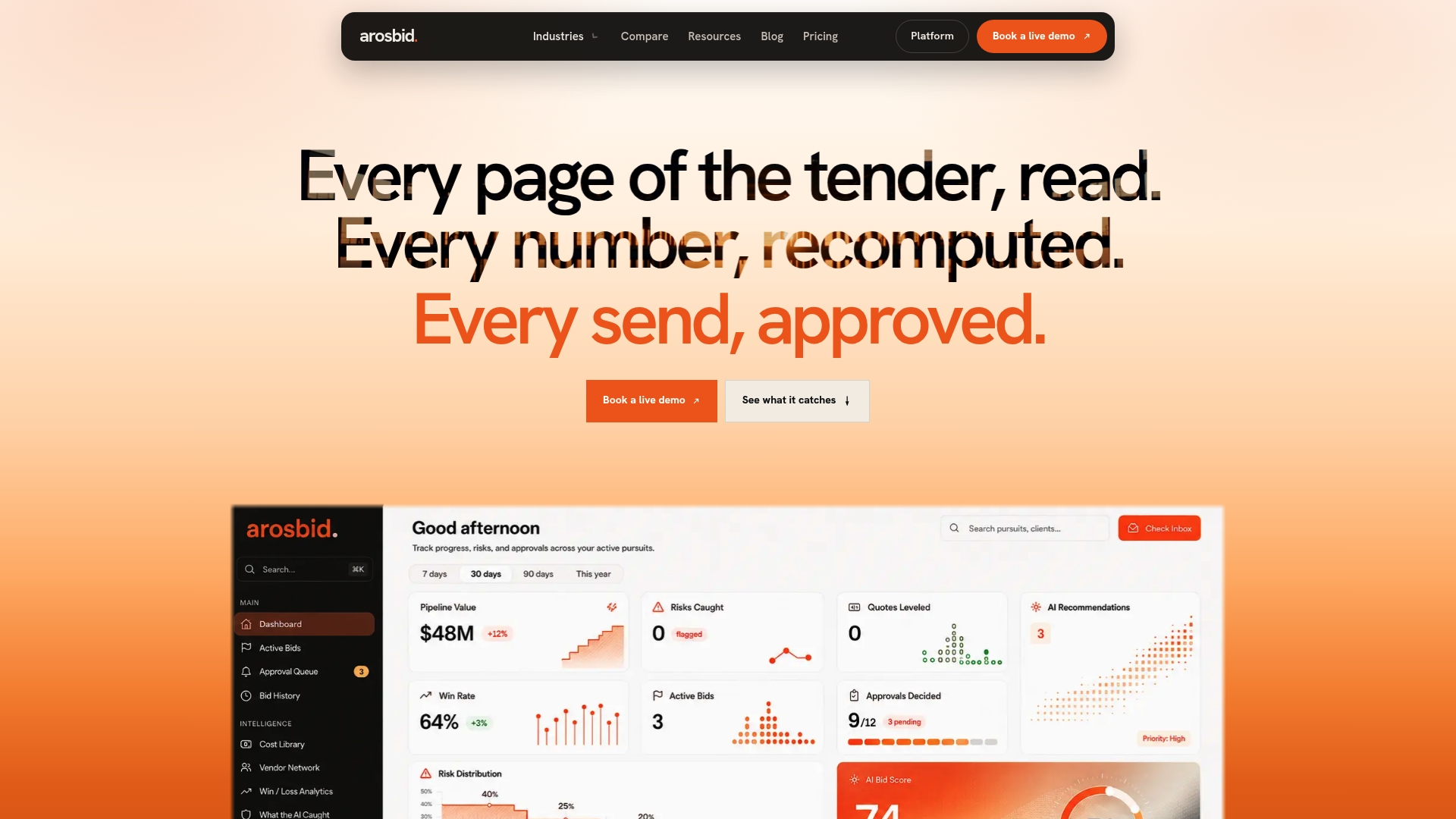
The quickest way to judge fit is to book a live demo and bring a recent set of bid documents with its addenda.
FAQ
What is bid data duplication?
It is the same bid information held in more than one place, such as a quantity in both the takeoff and the estimate, or a requirement in both a spec and a drawing note. The problem starts when one copy is changed and the others are not. Addenda, vendor quote revisions and copied estimates are the usual triggers.
How do I check for duplicate or conflicting bid information?
Keep a register of every document with its revision, date received and status. Reconcile what you priced against what was reissued and what you received, read every addendum item, and compare the proposal total to the estimate total. Log each difference until it is explained.
What should I do when two documents conflict?
First decide whether they truly conflict or just state the same requirement at different levels of detail. If they cannot both be satisfied, follow the contract’s order of precedence and the bidding instructions. If that does not resolve it, submit a question before the deadline where the rules allow, and record how you priced it.
Can software remove duplicate data from bids?
Software reduces duplication by keeping one record across document review, takeoff, estimate and quotes, and by flagging conflicts for review. It does not replace your team’s judgment on what a difference means for price and compliance. ArosBid integrates with Excel and Outlook so teams keep their existing workflow.
Sources
- Oregon DOT Management Letter 21-03, Addenda Process (October 18, 2021)
- Quality of tender documents: case studies from the UK (University of Reading)
- System Information Modelling in Practice: Analysis of tender documentation quality (Birmingham City University)
- Procore Standard Operating Procedures for the University of Alabama
- Bid Day Checklist: 15 Things to Verify Before You Submit (P2C Construction Services)