Stop False Opens in Outlook Email Tracking, Filter Scanners for Bids
Stop False Opens in Outlook Email Tracking, Filter Scanners for Bids ! Decorative email tracking title card illustration Outlook's built-in read and delivery receipts are not real email tracking.
Outlook’s built-in read and delivery receipts are not real email tracking. They’re recipient-controlled, easy to decline, and confirm only that a message hit a mail server, not that a human opened it. For internal analytics across a Microsoft 365 org, use Viva Insights. For per-recipient tracking on emails sent to prospects, vendors, or clients outside your organization, you need a dedicated Outlook-compatible add-in, and you should check its scanner filtering before you trust a single “opened” alert.
TL;DR:
- Outlook’s built-in read and delivery receipts only confirm message delivery to a mail server, not that a human has opened the email.
- External email tracking tools rely on pixel loading and link redirects, but image blocking and security gateways can produce false positives or obscure genuine opens.
- Verifying tracking tools requires controlled tests with different recipient types to distinguish between real opens and scans.
- Privacy regulations, especially GDPR, demand transparency and consent disclosures when using pixel-based tracking, which may also be blocked by default email client settings.
- Effective use of email trackers involves choosing tools that support your Outlook version, offer honest detection of scanners, and integrate seamlessly with your workflow and CRM systems.
Table of Contents
- What Outlook-Compatible Email Trackers Actually Do
- How Does Outlook Email Tracking Actually Work?
- Why Do Some Trackers Report False Opens?
- How Do You Set Up and Test Outlook Email Tracking?
- What Should You Ask Before Choosing an Outlook Tracker?
- How Do You Run a Trial Comparison Yourself?
- Tracking RFP Threads and Vendor Replies in Bid Workflows
- What Are the Privacy Rules Around Email Tracking?
- What Do Outlook Email Trackers Cost?
- Which CRM and Automation Tools Connect to Outlook Trackers?
- Which Outlook Trackers Are Easiest to Actually Use?
- How Reliable Is Support for These Tools?
- What Security Protections Do Third-Party Add-Ins Offer?
- The Real Trade-Off Nobody Puts on the Feature Comparison Page
- A Platform Built Around Bid Communications, Not Just Opens
- Sources
What Outlook-Compatible Email Trackers Actually Do
Nineteen tools show up when people search for ways to track Outlook emails, and they split into three rough categories: Microsoft’s own analytics layers, third-party add-ins built for sales teams, and general-purpose CRM platforms that happen to plug into Outlook. Picking the wrong category wastes more time than picking the wrong vendor within the right one.
If everyone you email is inside your Microsoft 365 tenant, Microsoft Viva Insights is the obvious starting point. It reports open rates and average reading time for messages sent to five or more internal recipients, with data landing in the Insights pane within about 30 minutes of sending. It’s free with most Microsoft 365 plans and does nothing for external contacts.
Dynamics 365 email engagement covers the CRM-integrated case. It logs opens, link clicks, and attachment downloads directly into the contact’s activity timeline using a uniquely tagged invisible image and redirect links, which is genuinely useful if your team already lives in Dynamics. Microsoft’s own documentation flags scanner opens and caching as known sources of noise in that data.
Track, listed on the Office Marketplace, advertises cross-device coverage, desktop and mobile, plus per-recipient opens, click tracking, and real-time push notifications. Those are strong claims worth verifying in your own inbox before you roll it out to a whole team.
Aftersend and Outsolvi both pitch themselves on Outlook fidelity rather than being Gmail tools with Outlook support bolted on. Aftersend leans on near real-time viewing insights and reserves true per-recipient detail for enterprise plans, a tiering pattern common enough among third-party add-ins that you should always ask about it upfront. Outsolvi’s angle is graded opens, sorting a raw “opened” event into human versus likely scanner activity, which matters enormously once you’re emailing corporate domains with security gateways.
Beyond that shortlist, Salesflare, HubSpot Sales Hub, Mailbutler, Mailsuite, Snovio Email Tracker, Streak CRM, MailTracker by Hunter, Cirrus Insight, Yesware, Mixmax, SalesHandy, and Boomerang all offer Outlook add-ins with pixel-based tracking, though the depth of Outlook support varies a lot between them, since several started as Gmail extensions.
Pro Tip: Before subscribing to any add-in, send yourself three test emails, one to a work address, one to a personal Gmail or Yahoo account, and one to an address you know sits behind a corporate security gateway. The pattern of “opens” you get back tells you more about a tool’s honesty than its marketing page.
How Does Outlook Email Tracking Actually Work?
Two entirely different mechanisms get lumped together under “email tracking,” and confusing them is the single biggest reason people misjudge their own data.
Native receipts work through message headers. A read receipt is a request the sender attaches to a message; the recipient’s mail client asks if they want to confirm reading it, and they can simply say no. A delivery receipt only confirms the message reached the recipient’s mail server, not that any human ever saw it.
Pixel-based tracking, used by nearly every third-party add-in, embeds a tiny invisible image with a unique URL in the email body. When the recipient’s email client loads that image, the tracker’s server logs a hit and calls it an “open.” Tracked links work similarly: clicking a link routes through a redirect server before landing on the real destination, and that hop gets logged as a click.
Dynamics 365 email engagement runs the same playbook server-side, using a uniquely named invisible image and redirect links to populate its activity timeline, while Viva Insights instead aggregates read-status and timing signals across your tenant rather than watching individual pixel fires.
Three things worth knowing about the mechanics:
- Pixel tracking only fires if images load automatically, which many corporate and privacy-conscious mail clients block by default.
- Tracked-link clicks are the more reliable signal of the two, since a click requires deliberate action rather than a background image request.
- Viva Insights data can take up to 30 minutes to populate, so don’t panic if a just-sent email shows no activity yet.
Why Do Some Trackers Report False Opens?
Three separate failure modes distort tracking data, and most vendors handle them with wildly different levels of honesty.
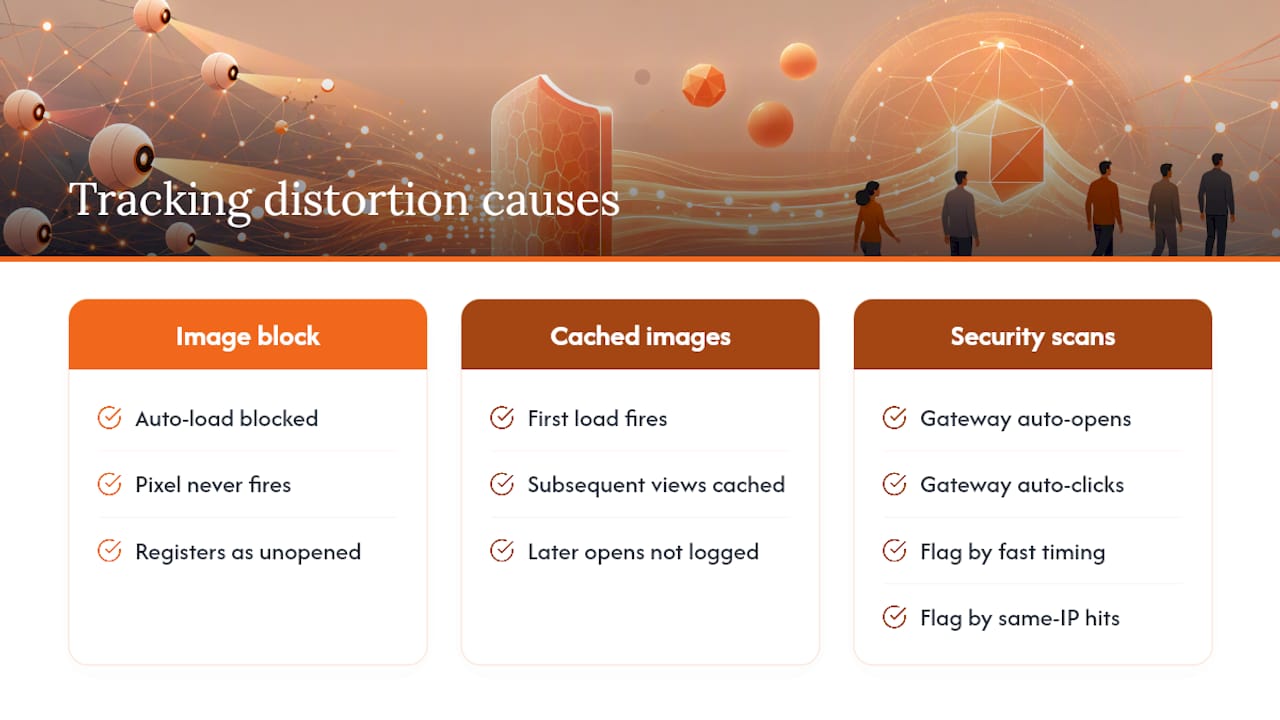
Image blocking is the biggest one. If a recipient’s client doesn’t auto-load images, the tracking pixel never fires, and a genuinely opened email registers as unopened. Cached images compound this: once an image loads once, some clients serve it from cache on repeat views, so a second or third open by the same person may never get logged at all.
Security gateways are the opposite problem. Corporate spam filters and link-scanning services often open every incoming message and click every link automatically to check for malware, which shows up in your dashboard as an instant “open” and “click” from someone who hasn’t seen the email yet. Vendors that ignore this problem will hand your sales team a stack of false hot leads.
The better tools, Outsolvi in particular, build detection logic that flags likely scanner opens, typically by looking at how fast the open happens after send and whether the same IP pattern hits dozens of messages at once. Dynamics 365 email engagement carries the same warning in its own documentation: treat interaction counts as approximations, not hard proof.
Attachment tracking has its own quirk. Some add-ins convert attachments into tracked links rather than true file attachments, which lets them log a “download,” but it also changes how the recipient experiences the email, and some corporate IT policies flag externally hosted attachment links as suspicious.
Pro Tip: If a vendor can’t explain how they tell a human open from a scanner open, assume they can’t, and budget for a healthy amount of noise in every open-rate report they send you.
How Do You Set Up and Test Outlook Email Tracking?
Getting native receipts running takes under a minute; validating a third-party tracker takes a bit more discipline.
- In classic Outlook desktop: open a new message, go to the Options tab, and check “Request a Read Receipt” and/or “Request a Delivery Receipt” before sending.
- In new Outlook: click the three-dot menu on a message window, choose “Show Ribbon” if needed, then find the same receipt toggles under Options.
- In Outlook on the web: open a new message, click the “…” menu, select “Show message options,” and check the receipt boxes there.
- Installing an add-in: go to File > Get Add-ins (or the Office Marketplace directly), search for the tracker by name, click Add, then enable per-message tracking from the compose window’s new toolbar icon.
- Run a validation test: send the same tracked email to three destinations at once and compare what comes back.
| Test recipient | What it reveals |
|---|---|
| Personal webmail (Gmail, Yahoo) with images allowed | Baseline human open behavior |
| Corporate address behind a known security gateway | Likely scanner open, often within seconds of sending |
| Account with image auto-download disabled | Confirms whether the tool relies purely on pixel fires |
If the “gateway” recipient shows an open before you’ve even switched windows, you’re looking at a scanner, not a reader. If the image-blocked recipient never registers an open despite you personally reading the email, the tool has no fallback tracking method, which limits how much you should trust its numbers going forward.
What Should You Ask Before Choosing an Outlook Tracker?
Start with Outlook surface support, since this single question eliminates more bad fits than any other. Confirm whether the tool works on classic desktop Outlook, the new Outlook, Outlook on the web, and mobile, because many trackers began as Gmail extensions and treat Outlook support as an afterthought.
Next, nail down whether you get per-recipient data on a multi-recipient send, or just an aggregate count. Several vendors, Aftersend included, reserve individual-level tracking for enterprise plans, so a free trial might show you numbers you’ll lose access to the moment you actually need them for a real campaign.
Ask directly about scanner filtering. A vendor that can describe how it flags automated opens versus human ones, the way Outsolvi does, is telling you something real about their engineering. A vendor that dodges the question is telling you something too.
- Does the free tier include link tracking, or only opens?
- Is data residency or storage location documented anywhere public?
- Does it integrate with your CRM, or just sit as a standalone Outlook sidebar?
- Can you run a real trial with your actual contact list before committing?
Red flags worth walking away from: no stated Outlook version support, a privacy policy that doesn’t mention tracking pixels at all, zero mention of scanner detection, and no trial period long enough to test against your own email traffic.
Pro Tip: Ask for the vendor’s own definition of “open.” Some count a pixel fire, some count a unique pixel fire per recipient, and a few quietly count preview-pane rendering as an open too. The definitions are not interchangeable.
How Do You Run a Trial Comparison Yourself?
A short, repeatable test protocol beats reading vendor spec sheets, because it shows you what actually happens in your own Outlook environment rather than a demo environment tuned to look good.
- Establish a baseline. Send five plain emails with no tracking to a mix of personal and corporate addresses, and note who actually replies.
- Install the tracker on one account and enable tracking on the same five-message batch, this time timestamped.
- Send controlled variants, one with a tracked link only, one with an image pixel only, one with both.
- Include recipient diversity, a webmail account, a corporate gateway account, and an account with images blocked.
- Compare logs against actual behavior you know occurred, checking whether opens lag realistically or spike instantly.
- Flag anomalies, particularly instant opens from corporate addresses and missing opens from people you know read the email.
Record open timing, click timing, and any repeat-open counts, since that last figure often exposes caching gaps fastest. A useful tolerance to accept: if two or three of your corporate test recipients show near-instant opens, that’s consistent with normal gateway scanning, not evidence the whole dataset is broken.
Use these findings when negotiating trial terms. A vendor confident in their scanner detection will happily let you run this exact test during a paid trial period rather than a stripped-down demo account.
Tracking RFP Threads and Vendor Replies in Bid Workflows
Bid teams live inside email threads that carry real deadlines: an RFP invitation, an addendum, a vendor’s quote reply, a subcontractor confirmation. Knowing whether a vendor opened your quote request the morning it’s due, versus three days later, changes how you sequence follow-up calls.
Tracking signals become genuinely useful here when they trigger action, not just when they populate a dashboard. An opened-but-unanswered RFP three days before a bid deadline should generate a follow-up task automatically, not sit buried in an inbox someone has to remember to check.
This is where pairing an email tracker with a bid-management platform earns its keep. Centralizing bid communications alongside vendor quotes and compliance documents means an Outlook tracking event doesn’t just tell you “opened,” it can update a timeline, flag a stalled vendor response, or feed into leveling once the quote actually arrives. Raw open counts alone rarely move a bid forward the way a logged, actionable follow-up does.

What Are the Privacy Rules Around Email Tracking?
Tracking pixels and read receipts sit in a gray zone that most people never think about until someone complains. Read receipts are explicitly opt-in on the recipient’s side, they can decline the request outright, which makes them the least legally fraught option of everything covered here.
Pixel-based tracking is different because the recipient never gets asked. Several jurisdictions, the European Union’s GDPR framework most notably, treat tracking pixels as a form of personal data processing that can require disclosure or consent depending on context and who the recipient is. Rules vary significantly by country and by whether you’re emailing a business contact or a private consumer, so don’t assume a policy that’s fine for B2B outreach in one market clears the bar everywhere.
Practical steps worth taking regardless of jurisdiction: disclose in your email signature or a linked policy that opens and clicks may be tracked, avoid tracking sensitive categories of correspondence, and give recipients a straightforward way to ask you to stop. Most email clients also let recipients block remote images by default, which functions as a built-in opt-out even without any action from the sender, since a blocked pixel simply never fires.
Corporate legal and IT teams increasingly expect vendors to document where tracking data lives and how long it’s retained. If a tool can’t answer that plainly, treat it as a compliance risk before you treat it as a productivity tool. This matters more the higher up the supply chain you sit, since bid and procurement correspondence often crosses company boundaries and sometimes public-sector rules that private sales emails don’t touch.
What Do Outlook Email Trackers Cost?
Pricing splits roughly into three tiers, and understanding where a tool sits saves you from a nasty surprise mid-trial.
Free or near-free: Viva Insights ships with most Microsoft 365 business plans at no extra cost, and it’s the cheapest entry point if your tracking needs are purely internal. Several third-party add-ins, including Mailsuite and Snovio Email Tracker, offer limited free tiers, usually capping the number of tracked emails per month or stripping out link tracking entirely.
Mid-tier subscriptions: Most dedicated Outlook add-ins, Yesware, Boomerang, SalesHandy, and similar tools, charge per-user monthly fees for their core tracking and notification features. This tier typically unlocks unlimited tracked sends and basic link tracking but often withholds per-recipient detail on group sends.
Enterprise plans: Per-recipient tracking on multi-recipient emails is frequently gated behind enterprise pricing, along with CRM integration, admin controls, and data residency guarantees. Dynamics 365 email engagement isn’t sold standalone either, it requires an existing Dynamics 365 Sales license, which makes its effective cost tied to a broader CRM commitment rather than a simple add-on fee.
The honest way to compare cost is to price out the feature you actually need, not the sticker price. A $5 monthly plan that only gives aggregate opens is more expensive than it looks if your job requires knowing exactly which of ten RFP recipients opened your quote.
Which CRM and Automation Tools Connect to Outlook Trackers?
The value of tracking data multiplies once it flows somewhere besides a dashboard you have to remember to check.
Dynamics 365 email engagement has the deepest native tie-in by design, opens and clicks post directly to the contact’s activity timeline, feeding lead scoring and follow-up sequences without any manual export. HubSpot Sales Hub and Salesflare both build their entire pitch around this: the Outlook tracking data exists to trigger CRM workflows, not just to display a green checkmark next to a sent email.
Streak CRM takes a lighter approach, living inside Gmail and Outlook as a visual pipeline rather than a full CRM, which suits smaller teams who find HubSpot or Dynamics overbuilt for their needs. Mixmax and Cirrus Insight both lean toward sales-sequence automation, chaining tracked emails into multi-step outreach campaigns rather than one-off sends.
For teams running bid and procurement workflows specifically, the integration that matters most often isn’t a marketing CRM at all. Knowing that a vendor opened your RFQ should update a bid timeline, not a lead score. That’s a different data pipeline than what most sales-focused trackers are built to serve, and it’s worth checking whether a tool’s “integrations” list includes anything beyond Salesforce and HubSpot before assuming it fits a construction workflow.
Which Outlook Trackers Are Easiest to Actually Use?
Feature lists rarely predict how a tool feels after the second week of daily use, and that gap trips up a lot of buyers.
Add-ins that live directly in the compose ribbon, toggled with a single click before sending, tend to get adopted faster than ones requiring a separate dashboard login to check results. Yesware’s tracking feature sits right in the send flow for this reason, and Boomerang follows a similar pattern by baking tracking into scheduling controls users already touch daily.
Mailbutler and Mailsuite both emphasize a lightweight sidebar approach, showing recent tracking activity without forcing a context switch away from the inbox. That matters more than it sounds: a tool that requires opening a second browser tab to check whether someone opened an email gets checked less often, which defeats the purpose of real-time tracking.
MailTracker by Hunter and Snovio Email Tracker lean minimal by design, offering basic open and click tracking with almost no configuration, which suits users who want a simple green checkmark and nothing more. The tradeoff is limited reporting depth if you later need per-recipient breakdowns or CRM sync.
The pattern worth watching for: any add-in that requires more than two clicks to enable tracking on a single email will get skipped under deadline pressure, no matter how good its analytics look in a sales demo.
How Reliable Is Support for These Tools?
Support quality tends to track directly with company size and target market, which is worth knowing before you sign an annual contract based on a slick demo.
Microsoft’s own tools, Viva Insights, Dynamics 365 email engagement, and native receipts, carry the support weight of Microsoft’s documentation ecosystem, meaning detailed written guidance is always available, though direct human support depends on your existing Microsoft 365 or Dynamics support tier.
Established sales-tool vendors, HubSpot, Yesware, SalesHandy, generally offer live chat and documented SLAs on paid plans, since their entire business model depends on sales teams trusting the data enough to build workflows around it. Smaller or newer entrants, including some Marketplace-listed add-ins, may rely on email-only support with slower response windows, which matters a great deal if a tracking outage happens mid campaign.
Reliability in the uptime sense is harder to verify without vendor-published status pages, and few of these tools publish one publicly. The safest approach during any trial is to test support responsiveness directly, send a real technical question during the evaluation period and time how long the answer takes, rather than trusting a sales page’s claims about response SLAs.
What Security Protections Do Third-Party Add-Ins Offer?
Every third-party Outlook add-in you install gets some level of access to your mailbox, which makes security posture a real evaluation criterion, not an afterthought.
Reputable vendors publish clear data handling policies covering what gets logged, tracking pixel hits, link clicks, message metadata, and how long that data is retained. Look specifically for whether the vendor stores email content itself or only tracking metadata, since those carry very different risk profiles if the vendor ever has a breach.
Enterprise-tier add-ins, including the tiers offered by Aftersend and similar tools, typically add role-based access controls and admin-level visibility into who on a team can see whose tracking data, which matters once tracking rolls out past a single user to a full sales or bid team. Encryption in transit is close to universal among established vendors, but encryption at rest and data residency location, which country or region actually hosts the logs, varies enough that it’s worth asking directly rather than assuming.
The Microsoft-native options carry an inherent advantage here: data stays inside your existing Microsoft 365 tenant boundary rather than flowing to a third-party server at all, which simplifies compliance conversations considerably for regulated industries.
The Real Trade-Off Nobody Puts on the Feature Comparison Page
Every vendor page frames this as a features race, more surfaces supported, more granular per-recipient data, faster real-time alerts. That framing misses the actual decision most teams are making, which is a trade-off between data richness and data trust.
The tools that report the cleanest, most impressive-looking numbers are frequently the ones doing the least to filter scanner noise. The vendors willing to show you a messier, more honest number, Outsolvi’s graded-open approach being the clearest example in this category, are usually the ones you should trust more, not less.
The conventional advice, “pick the tracker with the most features,” also undersells how much Outlook surface compatibility should dominate the decision. A tool with brilliant analytics that only half-works in new Outlook is worse than a simpler tool that works everywhere your team actually opens mail.
For construction bid teams specifically, the priority should invert entirely from how most sales blogs frame this topic. Open rates matter far less than knowing which vendor thread went cold three days before a deadline. That’s a workflow problem a tracking pixel alone can’t solve, no matter how accurate it gets.
— arosbid team
A Platform Built Around Bid Communications, Not Just Opens
Email tracking tells you whether an RFP or vendor quote got opened. It doesn’t tell you whether the right addendum made it into your estimate, whether a vendor’s quote conflicts with another one, or whether a compliance document is missing before submission deadline. Certain platforms aim to close that gap for construction trades running commercial, industrial, and civic bids.
Some platforms centralize bid management so vendor quote tracking, document compliance checks, and proposal assembly all sit in one command center instead of scattered across inboxes and spreadsheets. They integrate with Excel and Outlook directly, so teams already tracking RFP threads and vendor replies can layer that activity into a structured bid timeline rather than replacing tools they already know.
If your team handles steel, mechanical, or roofing bids and loses time chasing down which vendor quote actually matches the latest spec, arosbid’s industry-specific bid software is built around exactly that scrutiny. Book a live demo to see how bid tracking, vendor leveling, and compliance checks work together before your next submission deadline.